What is Celiq
A conceptual tour of Celiq — a self-hosted semantic analytics platform where you model once, explore without SQL, and ask Orion in plain English.
When to use it — Read this first, before any other page, to understand how the pieces fit together.
Where to find it — This is the front door. Once you sign in, the product opens on Discover (the eye icon in the bottom navigation pill).
Who can use it — Everyone: Luminary, Weaver, Tracer, and Lens. What each role can do differs, and that is covered below.
Celiq connects to your data warehouse, lets a builder describe what the data means once, and then lets everyone else ask questions of it — by clicking, or in plain English — without touching SQL. This page is the conceptual map. It explains the core flow and the four hubs you see in the navigation, then points you to the pages that cover each piece in depth.
Overview
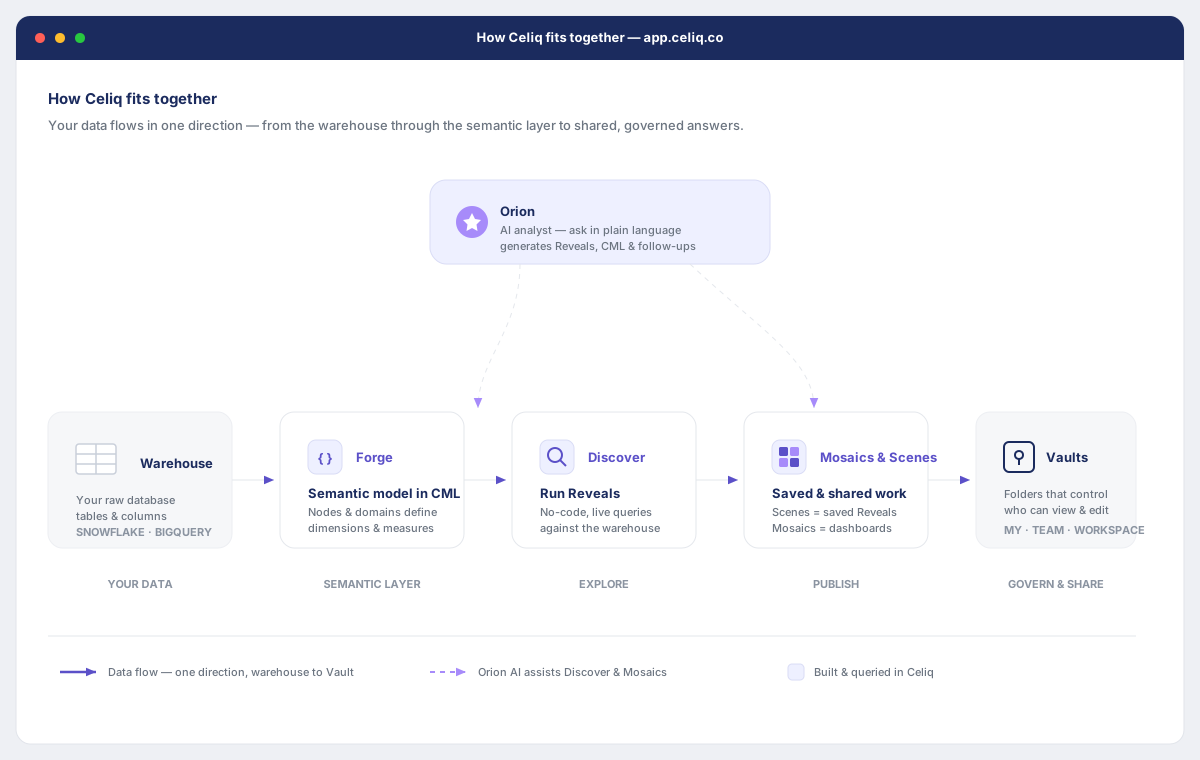
Celiq sits on top of the warehouse you already have. It does not move or copy your data — it queries it live. The value Celiq adds is a semantic layer: a shared, version-controlled definition of what every table, field, and metric means. Once that layer exists, three things become true at once:
- Analysts stop writing SQL. They pick fields and filters; Celiq generates and runs the query.
- Numbers stop diverging. When a metric is defined once, everyone who uses it gets the same answer.
- AI can be trusted. Because Orion reads the same governed semantic layer humans do, its answers are grounded in your definitions rather than guessed from raw column names.
Everything in the product flows in one direction:
Data warehouse → Forge (semantic model in CML) → Discover (Reveal, no SQL) → Prism / Mosaic → VaultYour raw tables live in the warehouse. Forge is where a builder defines what those tables mean, in CML. Discover is where anyone queries that model without SQL — each live query session is a Reveal. You save a Reveal as a Prism, or pin it to a Mosaic (a dashboard). Both live inside a Vault, which controls who can see them. Orion, the AI layer, reads the same semantic model and answers questions in plain language across that whole flow.
When to use it
Read this page when you are new to Celiq and want the big picture before diving in. It is intentionally conceptual — it tells you what the pieces are and how they connect, not the mechanics of using each one. For hands-on detail, follow the links throughout and in Related pages.
You do not need to read this page to get value if someone has already built a Mosaic for you — you can open it and read it. But understanding this flow makes everything else in the product click into place.
Concepts
These are the core ideas. Each one has a dedicated page; the Key concepts page covers the mechanics in depth. Here is just enough to orient you.
| Term | What it is |
|---|---|
| Warehouse | Your existing database (Postgres, BigQuery, Snowflake, or DuckDB). Celiq queries it live; it never holds a second copy of your data. |
| Semantic model | The governed definition of what your data means — names, dimensions, metrics, and security rules. The single source of truth. |
| CML | Celiq Modelling Language — the YAML-based syntax you write the semantic model in, inside Forge. |
| Forge | The place builders define and edit the semantic model. |
| Discover | The no-SQL query builder everyone uses to explore the model. |
| Reveal | A single live query session in Discover. It re-runs against the warehouse every time you change it. |
| Prism | A saved Reveal — the question is fixed, the answer refreshes against current data. |
| Mosaic | A dashboard: a collection of tiles, each backed by a Prism or Reveal. |
| Vault | A folder that holds Prisms and Mosaics and controls who can view or edit them. |
| Orion | The AI layer that understands the semantic model and answers natural-language questions. |
Celiq separates a Reveal (a live, unsaved session) from a Prism (a saved result) on purpose. The question you save stays fixed; the answer updates every time the Prism is opened. This makes sharing and scheduling predictable.
The four hubs
The bottom navigation pill groups the product into a few hubs. Three of them are pickers that open a menu; the rest navigate directly. What you see depends on your role.
| Hub | Icon | What lives here | Who sees it |
|---|---|---|---|
| Discover | Eye | The no-SQL query builder — where you build Reveals. | Everyone |
| Folio | Template | The reporting hub: Mosaics, WBR, and Workbooks. | Everyone |
| Loom | Needle & thread | The build hub: Projects, Forge, Studio, and Context Studio. | Weaver and Luminary |
| Suite | Grid | The full sitemap — every other page, grouped into Explore, Operate, AI, and Govern. | Everyone (items filtered by role) |
Alongside these, Vaults (where saved work lives), Lumen (admin), and Trash appear in the pill for the roles that can use them. Lumen and Trash are Luminary-only.
The takeaway: Discover is where you ask, Folio is where you present, Loom is where builders model, and Suite is the directory to everything else.
The four roles
Every person in a workspace has exactly one role. The role decides what they can do — not just what they can see.
| Role | In one line | Can build the model? | Can run Reveals? | Can administer? |
|---|---|---|---|---|
| Luminary | Administrator | Yes | Yes | Yes |
| Weaver | Builder | Yes | Yes | No |
| Tracer | Analyst | No | Yes | No |
| Lens | Viewer | No | No (views shared work) | No |
A Lens can open Mosaics and Prisms shared with them. A Tracer can run their own Reveals in Discover and save Prisms. A Weaver can additionally edit the semantic model in Forge. A Luminary can do everything, including managing users and security. See User roles for the full breakdown.
Getting started
You do not need to set anything up to read this page. To start using Celiq:
Sign in
Open your workspace URL and sign in. Celiq opens on Discover by default.
Find the navigation pill
Look at the floating pill at the bottom-centre of the screen. This is how you move between hubs. It hides as you scroll down and reappears as you scroll up.
Confirm a warehouse is connected
If a builder has already connected a warehouse and modelled data, Discover will offer nodes you can explore. If it is empty, a Luminary or Weaver needs to connect a warehouse first — see Connecting a warehouse.
Read the mechanics next
Move on to Key concepts for how Reveals, Prisms, Mosaics, and Vaults actually work, then try the Quick start.
Examples
Here is the same business question answered three ways, to show how the layers connect.
A Weaver defines the metric once in CML, inside Forge:
measure:
  - name: total_revenue
    label: Total Revenue
    type: sum
    sql: ${revenue}
    format: usd
A Tracer then answers "revenue by month" in Discover with no SQL — they pick the Total Revenue measure, group by order date at month granularity, and Celiq runs the query live. They save the result as a Prism and pin it to a team Mosaic.
A Lens who cannot build anything simply asks Orion in plain English:
What was total revenue by month this year?Because Orion reads the same total_revenue definition, all three paths return the identical number — there is no second definition of "revenue" anywhere. That single-definition guarantee is the whole point of the semantic layer.
Best practices
- Model once, in Forge. Resist defining the same metric in two places. One CML definition keeps every Reveal, Mosaic, and Orion answer consistent.
- Save questions, not screenshots. Prefer a Prism or Mosaic over exporting a static image — saved work refreshes against live data.
- Organise with Vaults early. Decide what is personal, what is team-shared, and what is workspace-wide before content piles up.
- Let the right role do the right job. Builders shape the model in Loom; analysts explore in Discover; everyone can ask Orion.
Tips
The fastest way to learn Celiq is to ask Orion a question you already know the answer to. Seeing how it reads the semantic model — and which fields it picks — teaches you the model's shape quickly, and builds trust in its answers.
Common mistakes
- Treating Discover like a SQL editor. Discover is a no-SQL query builder. If you find yourself wanting raw SQL, the metric you need probably belongs in the semantic model in Forge.
- Confusing a Reveal with a Prism. A Reveal is a live, unsaved session — close the tab and it is gone. A Prism is the saved version. Save before you navigate away.
- Expecting to see every hub. Loom, Lumen, and Trash are role-gated. If you do not see them, your role does not include them — that is by design, not a bug.
- Looking for "Scenes." Saved Reveals are called Prisms. "Scenes" is an older name you may still hear; the product uses Prisms.
Troubleshooting
| Symptom | Likely cause | What to do |
|---|---|---|
| Discover has nothing to explore | No warehouse connected, or no semantic model built yet | A Luminary or Weaver needs to connect a warehouse and model data in Forge |
| You cannot see the Loom hub | Your role is Tracer or Lens | Loom is for Weaver and Luminary; ask a Luminary if you need build access |
| You cannot see Lumen or Trash | These are Luminary-only | Ask a Luminary to make the change you need |
| Orion's number differs from a colleague's | A metric may be defined in two places, or you are filtered differently | Check the metric in Forge; confirm the same definition backs both |
| A saved view is empty for one person but not another | Vault access or row-level security differs by user | Check the Vault's access and any Data Keys with a Luminary |
Related pages
- Key concepts — the mechanics of nodes, Reveals, Prisms, Mosaics, and Vaults
- Getting started — the section landing page and where to go next
- Quick start — build your first Reveal end to end
- Orion — how the AI layer reads the semantic model
- User roles — what each role can and cannot do
- Navigation — the hubs and the bottom nav pill in detail