Confidence and provenance
How Orion shows where every data answer came from, how fresh it is, and how much to trust it — via the provenance footer and confidence badge.
When to use it — Every time you read an Orion answer, before you act on it or share it upstream — check the badge and expand the footer.
Where to find it — Directly under each Orion answer in the chat (the Orion page, and anywhere Orion answers are shown).
Who can use it — Lens, Tracer, Weaver, and Luminary all see provenance on every answer.
Orion never hands you a number without telling you where it came from. Under each data answer you get a small provenance line — the source name, a freshness label, and a colored confidence badge — that you can expand into a full provenance card. This is how you tell a certified, governed answer apart from a raw-SQL one-off, without re-deriving the number yourself.
The confidence badge reflects the source tier Orion drew from, not how confidently the answer is worded. A fluent, assertive paragraph built on raw SQL is still Low confidence; a terse number pulled from a certified reveal is High. Trust the badge, not the prose.
Overview
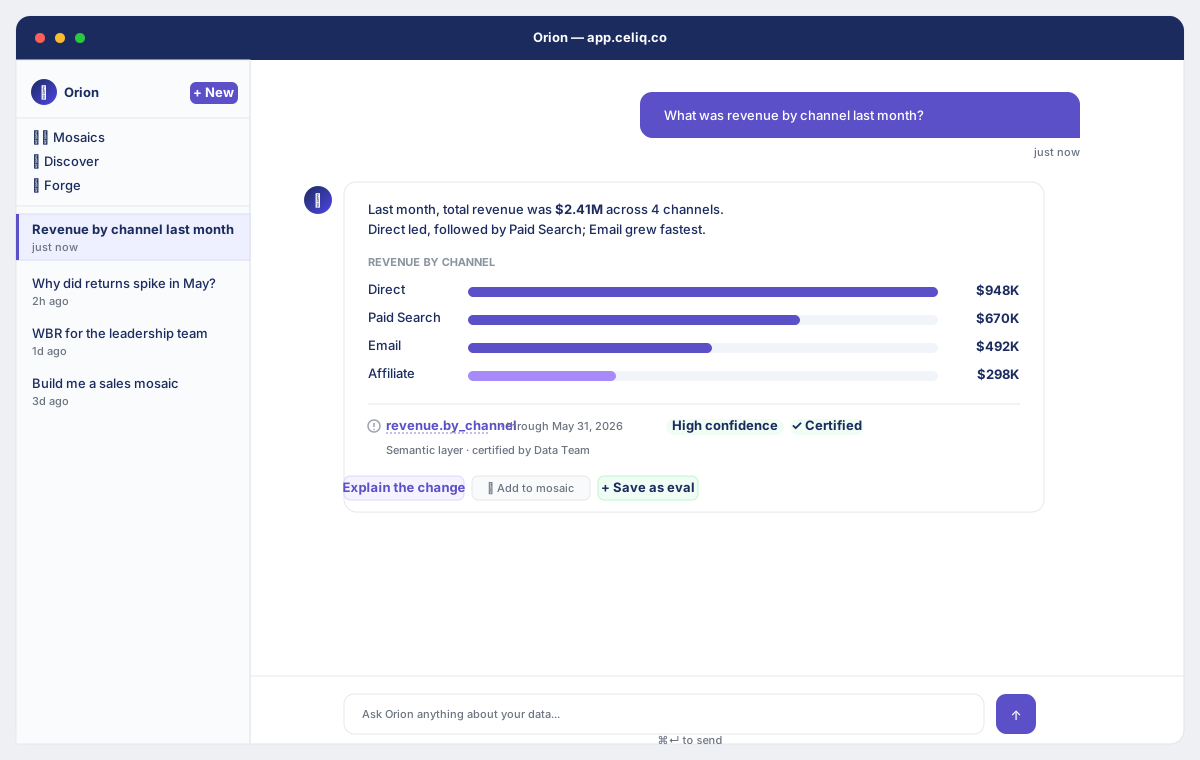
Every Orion data answer ends with a provenance footer. When Orion has structured provenance, it renders as a compact one-line summary you can expand into the full provenance card:
- A source — either the reveal name (a dotted-underline link to the catalog) or the source tier (Semantic layer, Raw SQL, or Memory).
- A freshness label — "through <date>", where the date is the most recent date present in the data Orion actually queried.
- A confidence badge — High (green), Medium (amber), or Low (red).
- Optional chips — a warnings count, and a green "Certified" check when the reveal is certified.
Expanding the card reveals the supporting detail: who certified the reveal, the tables used, any data-quality warnings, and a "SQL reviewed and corrected" note when Orion's reviewer fixed the query. The card also gives you jump links to View in Discover, Context Studio, and the evals.
When to use it
- Before you trust a number. Glance at the badge color. High means it came from a certified reveal; Medium and Low both carry a "verify before sharing" caveat.
- Before you share an answer upstream. Expand the card and confirm the source, freshness, and certification. A Low-confidence raw-SQL answer is fine for exploring, but say so when you pass it on.
- When a number looks off. Check the freshness label first — the data may simply end earlier than you assumed. Then check the tables used and any warnings.
- When two answers disagree. Compare their source tiers. A certified reveal should win over a raw-SQL answer to the same question.
Concepts
| Term | What it means |
|---|---|
| Source tier | Where the answer's data came from. Certified reveal, uncertified reveal, semantic layer, raw SQL, or memory. This drives the confidence level. |
| Reveal | A governed query in the semantic layer (Discover/Forge). Answers built on a reveal are inherently more trustworthy than ad-hoc SQL. |
| Certified reveal | A reveal a Luminary or Weaver has marked certified. Orion looks up the certification and stamps the answer High confidence with a "Certified by" note. |
| Freshness | The MAX date present in the data Orion queried — not today's date. Labeled "through <date>". If the data lags the real calendar, Orion says so. |
| Confidence badge | High / Medium / Low, derived from the source tier (see below). For event logging it is also recorded numerically as 0.9 / 0.6 / 0.3. |
| Provenance card | The expandable detail panel under the footer: certifier, tables used, warnings, reviewer note, and jump links. |
How confidence is derived
Confidence maps directly from the source tier — it is not a judgement about how well-written the answer is:
| Source tier | Confidence | Badge | Logged score |
|---|---|---|---|
| Certified reveal | High | green | 0.9 |
| Uncertified reveal | Medium | amber | 0.6 |
| Raw SQL / none | Low | red | 0.3 |
The High/Medium/Low tier is what you see; the 0.9 / 0.6 / 0.3 value is recorded on the analytics event for measuring answer quality over time. Data-quality findings can pull a tier down — a strong warning or a failed quality check drops the answer to Low, and lesser warnings can drop a High answer to Medium.
Getting started
There is nothing to enable — provenance ships on every Orion data answer automatically.
Open Orion
Go to Orion from the main navigation and ask a data question, e.g. "What was revenue last week?"
Read the footer
Under the answer, find the one-line provenance summary: source name, "through <date>", and the colored confidence badge.
Expand the card
If a ▼ toggle is shown, click it to open the full provenance card with certifier, tables, warnings, and jump links.
Step-by-step
Check the confidence badge
Look at the badge color first. Green/High came from a certified reveal — safe to act on. Amber/Medium came from an uncertified reveal — usable, but verify before sharing upstream. Red/Low came from raw SQL or had data-quality issues — treat as exploratory.
Check the source
If the source is a reveal name (dotted underline), that is a governed query — click it to view it in the catalog. If it reads "Raw SQL", Orion wrote a one-off query, which is why confidence is Low.
Check the freshness
Read "through <date>". This is the latest date in the data Orion queried, not today. If the answer was for "last week" but the date is older, the dataset simply ends earlier — Orion anchors relative ranges to the data's most recent date rather than inventing an empty future window.
Expand for detail
Click the ▼ toggle. The card shows Certified by (and date) for certified reveals, the Tables used, any Warnings, and a green ✓ SQL reviewed and corrected note if Orion's reviewer fixed the query before running it.
Jump to the source
Use View in Discover → to open the reveal, Context Studio → to inspect semantic health, or View evals → to see how this answer scored.
Examples
A certified-reveal answer renders a footer like this (the plain-text form Orion appends to its message):
---
Source: weekly_revenue · Freshness: data through 2026-06-20 · Confidence: high
The structured provenance behind that footer, which drives the badge and card, looks like:
{
  "source_tier": "semantic_layer",
  "reveal_name": "weekly_revenue",
  "reveal_domain": "sales",
  "freshness": "2026-06-20",
  "confidence": "high",
  "tables_used": ["orders", "order_lines"],
  "warnings": [],
  "certified_by": "amir@acme.com",
  "certified_at": "2026-05-02",
  "reviewer_fixed": false
}
A raw-SQL answer to the same question, with no reveal, carries a Low badge and a footer such as:
---
Source: raw SQL — orders · Freshness: data through 2026-06-18 ⚠️ 2 days behind · Confidence: low — data quality issues, verify before using
Honesty rules behind provenance
Two trust rules govern what Orion is allowed to say, and they are the reason provenance can be relied on:
- Observed fact vs. possible explanation. On a "why" question — "why did revenue drop?" — Orion keeps what the data proves separate from what might explain it. The contribution of each segment to a change (e.g. "Search accounted for 67% of the decline") is an observed fact. The real-world cause of that move is almost never in the data, so Orion labels it as a hypothesis with a qualifier ("a likely driver is…", "one factor may be…") and never states a cause as settled. Decomposition tells you which segment moved, never why.
- Honest date labeling. Because Orion anchors relative ranges to the dataset's latest date, it will not call a figure "yesterday", "today", "this week", or "last week" unless that exact calendar period is what the figure actually covers. Instead it labels the real date (e.g. "Jun 13" or "week of Jun 7–13") and flags when the latest data lags the real calendar.
Best practices
- Read the badge before the words. The confidence level is the source tier, not the tone of the answer.
- Promote frequently-asked questions into reveals, then certify them. Certified reveals are the only path to a High badge — see Certifications.
- When sharing a Medium or Low answer, carry the caveat with it. The footer literally says "verify before sharing upstream" for a reason.
- Always sanity-check the freshness date against the period you asked about before quoting a number.
Tips
A certified reveal is the only source that earns a High badge. If an important answer keeps coming back Medium, build it as a reveal in Discover and have a Weaver or Luminary certify it — Orion will pick up the certification automatically on the next answer.
Common mistakes
Reading the freshness date as "today". "Through 2026-06-18" means the data ends on the 18th, not that the answer is as of today. If you asked for "this week" and the date is older, the dataset lags — Orion anchored to the latest available data.
Treating a contributing segment as the cause. "Search drove 67% of the drop" is an observed contribution, not a reason. Why Search moved is a hypothesis, and Orion labels it as one.
Troubleshooting
| Symptom | Cause | Fix |
|---|---|---|
| Badge is Low for a familiar question | Orion used raw SQL — no reveal covers it | Build the question as a reveal in Discover; confidence rises to Medium, then High once certified. |
| Badge is Medium, reveal exists | The reveal is not certified | Have a Weaver or Luminary certify it — see Certifications. Orion stamps High and adds "Certified by" next answer. |
| Freshness shows a ⚠️ flag | No date found in the data, or the data lags the real calendar | Check the source table's load schedule in Data health. The number is still real — just older than today. |
| A warnings chip appears | A data-quality check flagged the query | Expand the card to read the warnings; a strong warning also drops the badge to Low. |
| "✓ SQL reviewed and corrected" on the card | Orion's reviewer caught and fixed an issue in its own SQL before running it | Informational — the answer ran on the corrected query. Still verify Low/Medium answers before sharing. |
| No footer at all | The reply was conversational, not a data answer | Provenance only attaches to answers backed by data. Ask a data question to get a footer. |