Reveals
Reveals are the first-class, named business metrics defined inside a domain — the certified building blocks Orion, Mosaics, and Discover use to answer questions.
When to use it — Whenever you want a metric to be a shared, reusable, certifiable concept across the workspace — not just a one-off column in a single chart.
Where to find it — Reveals are authored in Forge inside a domain's
reveals: array, and reviewed in the Metric definitions view of Context Studio (Context Studio overview). They surface to users in the Catalog and Marketplace.Who can use it — Weaver and Luminary author and certify Reveals; Tracer and Lens consume them.
A Reveal is how Celiq turns a raw measure into a business metric people can trust. Instead of every analyst rebuilding "net revenue" from columns, a Weaver defines revenue once — as a Reveal — and the whole workspace (Orion, the Catalog, Mosaics) uses that single definition.
Reveals are not stored in their own table. They live inside each domain's CML, under a reveals: array, and Celiq flattens them across every domain when it builds the metrics catalog.
Overview
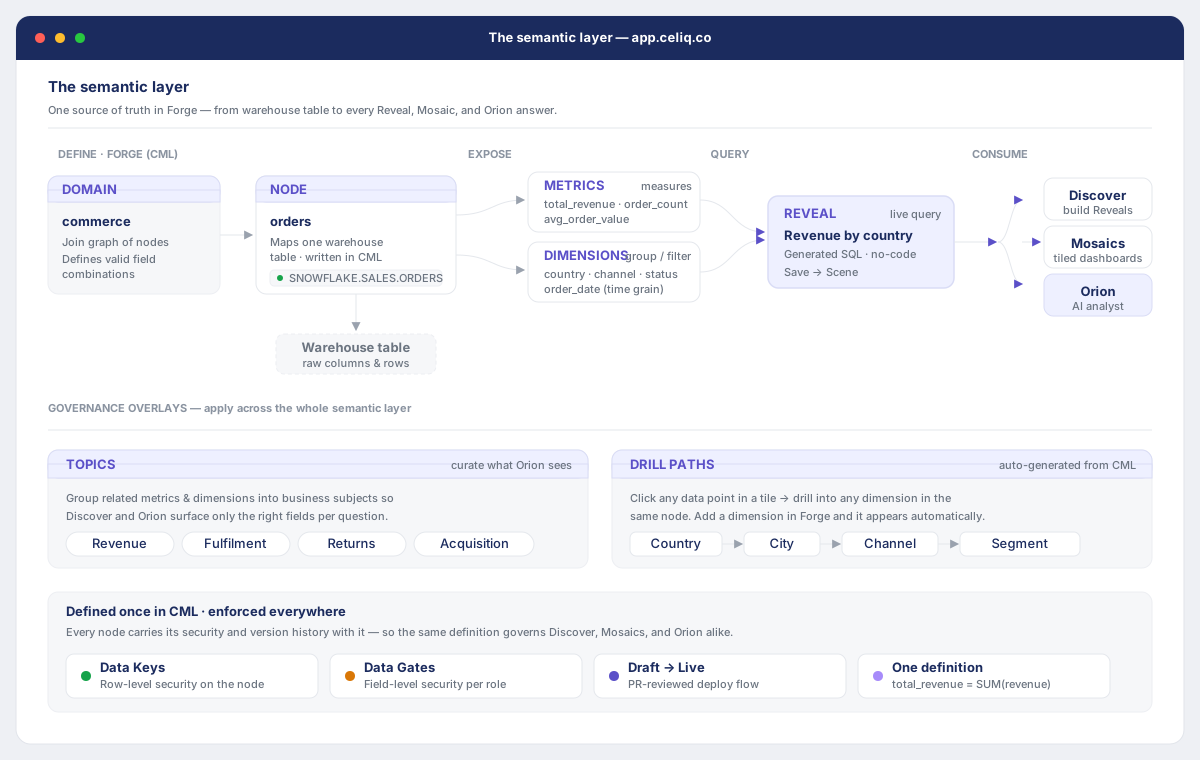
Each domain owns a list of Reveals. A Reveal points at a primary node (the table/node the metric is anchored to) and carries everything needed to describe and run the metric: a human label, a description, a default time grain, suggested attributes and metrics, optional filters, AI context, and sample queries.
When a user opens the metrics catalog, Celiq reads every domain's CML, pulls out each domain's reveals: array, and merges them into one flat list (catalogService.listReveals). Each flattened Reveal is enriched with three things:
- Certification — whether a Weaver has signed off on the definition (from the
reveal_certificationstable). - Usage counts — how many Mosaic tiles use it and how often it has been queried (derived from
mosaic_tilesandquery_logs). - Conflict status — whether another domain defines a Reveal with the same name but a different meaning.
Reveals with no description, no usage, and no certification are treated as auto-generated stubs and hidden from the catalog, so the list only shows metrics that carry real signal.
When to use it
Define a Reveal when a metric is a shared concept, not a throwaway calculation:
- The number appears in board reporting, weekly reviews, or multiple Mosaics — and everyone must compute it the same way.
- You want Orion to recognize the metric by name and answer questions about it accurately.
- You want to certify the metric so consumers can see it has been reviewed and approved.
- You want the metric to be discoverable in the Catalog and packageable into the Marketplace.
If you only need a measure for a single chart and it has no business meaning beyond that chart, a node-level measure is enough — you do not need a Reveal. See Concepts for the distinction.
Concepts
| Term | What it means |
|---|---|
| Reveal | A domain-level, named business metric in the reveals: array. First-class: certifiable, discoverable, conflict-checked, usage-tracked. |
| Node-level measure | A measure defined under a single node (e.g. total_revenue on the orders node). It is the raw aggregation; a Reveal wraps and promotes it into a business metric. |
| Primary node | The node a Reveal is anchored to (primary_node). Reveal resolution finds the matching reveal in the domain and returns it together with this node. |
| Suggested attributes / metrics | The default dimensions to break the metric by and the underlying measures it draws on. These pre-populate Discover and Orion when the Reveal is used. |
| Certification | A governance action (Weaver and above) that records that a Reveal's definition has been reviewed and approved. |
| Conflict | Two Reveals share a name (case-insensitively) across different domains but have different descriptions — a sign of competing definitions. |
A Reveal is the business metric; a node-level measure is the raw aggregation it is built on. The Reveal revenue might point at the total_revenue measure on the orders node — but the Reveal is what carries the shared label, description, AI context, certification, and usage tracking.
Getting started
Prerequisites:
- A domain already exists in Forge with at least one node and the measures you want to surface. See Domains.
- You have the Weaver or Luminary role to author or certify Reveals.
To open the authoring surface:
- Open Forge and select the project and domain you want to edit.
- Edit the domain's CML and add (or extend) the
reveals:array. - Run the Check & Save gate to validate and save.
To review existing Reveals, open Context Studio and go to the Metric definitions section — it lists every Reveal grouped by domain, with certified / needs-review / conflict badges.
Step-by-step
Pick the metric and its primary node
Decide the business metric you want to define (e.g. "Revenue") and which node it is anchored to (e.g. orders). The primary node is what resolveReveal returns alongside the Reveal, so it must be a real node in the domain.
Add the Reveal to the domain's reveals: array
In Forge, add an entry to reveals: with at least name, label, description, and primary_node. The description matters: Reveals with no description and no usage are hidden from the catalog as stubs.
Wire up suggested attributes and metrics
Add suggested_attributes (the default dimensions to break by) and suggested_metrics (the underlying node measures). These pre-fill Discover and Orion when the Reveal is used.
Add AI context and sample queries (recommended)
Add an ai_context block describing how Orion should treat the metric (caveats, what to exclude, alert thresholds) and a sample_queries list of representative natural-language questions. These flow into Orion's understanding of the metric.
Validate and save
Run the Check & Save gate in Forge. Once saved, the Reveal appears in the flattened metrics list and shows up in the Catalog and Context Studio.
Certify the definition
As a Weaver or Luminary, certify the Reveal so consumers know it has been reviewed (see Examples). Certification is recorded against the workspace, domain, and reveal name.
Examples
A worked Reveal in a domain's CML. This defines the revenue Reveal anchored to the orders node, with a default grain, suggested attribute and metric, AI context, and sample queries:
domain: ecommerce
label: "Ecommerce"
nodes:
  - name: orders
    physical_table: DW_PROD.OMS.FCT_ORDERS
    measures:
      - name: total_revenue
        sql: "SUM(CASE WHEN status NOT IN ('cancelled','returned') THEN revenue_usd ELSE 0 END)"
        type: currency
        description: Net revenue excluding cancelled and returned orders.

reveals:
  - name: revenue
    label: "Revenue"
    description: "Total order revenue over time, excluding cancellations and returns."
    primary_node: orders
    default_grain: day
    suggested_attributes:
      - node: orders
        attribute: order_date
    suggested_metrics:
      - node: orders
        metric: total_revenue
    ai_context: >
      Always use total_revenue (not gross_revenue) as it excludes returns and cancellations.
      US drives approximately 65% of total revenue. Return rate above 15% triggers a P1 alert.
    sample_queries:
      - "What was revenue last month by region?"
      - "Show me daily revenue for Q2"
Note how the Reveal's total_revenue under suggested_metrics points at the node-level measure of the same name — the Reveal promotes that raw measure into a named, shared business metric.
Best practices
- Always write a real description. It is what distinguishes a meaningful Reveal from an auto-generated stub — undescribed, unused, uncertified Reveals are hidden from the catalog.
- Keep names consistent across domains. If two domains genuinely mean the same thing by
revenue, give them matching descriptions so they are not flagged as a conflict. - Anchor to the right primary node.
resolveRevealreturns the reveal together with itsprimary_node; the wrong node sends queries to the wrong table. - Invest in
ai_context. This is where you tell Orion the caveats (what to exclude, attribution limits, alert thresholds) so it answers accurately. - Certify once the definition is stable. Certification is a trust signal for Tracer and Lens consumers — certify deliberately, not by default.
Tips
The metrics list sorts by usage by default (query count plus mosaic count), so your most-used Reveals float to the top. If a new Reveal isn't appearing, check that it has a description, usage, or certification — pure stubs are filtered out until a workspace has nothing else to show.
Common mistakes
- Defining a Reveal for a one-off chart measure. If a measure has no shared business meaning, leave it as a node-level measure — don't promote every aggregation to a Reveal.
- Reusing a name with a different meaning. Two domains defining
revenuewith different descriptions will be flagged as a conflict in Context Studio. Either align the definitions or rename one. - Forgetting the
primary_node. Without a resolvable primary node, the Reveal can't be tied back to a real table. - Leaving a Reveal undescribed. It will be treated as a stub and hidden from the catalog.
- Expecting Tracer to certify. Certification requires Weaver or above — a Tracer or Lens attempt is refused.
Troubleshooting
| Symptom | Cause | Fix |
|---|---|---|
| Reveal doesn't appear in the catalog | It has no description, no usage, and is not certified — so it's filtered as an auto-generated stub | Add a real description, use it in a Mosaic, or certify it |
| "Requires Weaver role or above" when certifying | Certification is restricted to Weaver and Luminary (the hierarchy is luminary > weaver > tracer > lens) | Have a Weaver or Luminary perform the certification |
| "domain required" when certifying or revoking | The certify/revoke action needs the domain the Reveal belongs to | Supply the domain name; the same reveal name is certified per domain |
| Conflict badge on a Reveal in Context Studio | Another domain defines a Reveal with the same name but a different description | Align the descriptions, or rename one of the Reveals |
| Usage shows zero even though it's used in charts | Usage counts are cached per workspace for one hour and derived best-effort from mosaic_tiles / query_logs | Wait for the cache to refresh; confirm tiles/queries record the reveal source |
| Orion picks the wrong table for a metric | The Reveal's primary_node points at the wrong node | Correct primary_node so resolveReveal returns the right node |
Related pages
- Domains — the container that owns a Reveal's
reveals:array. - Metrics — node-level measures and calculated metrics that Reveals build on.
- Catalog — where certified Reveals become discoverable to consumers.
- Marketplace — packaging Reveals into installable domain packs.
- Certifications — the certification model across semantic objects.