Create a Prism
Save a Discover query as a Prism, name it and pick a Vault, then run it and pin it to a Mosaic as a live tile
Time: ~5 minutes
You'll need: An existing Reveal in Discover and a connected warehouse
Role: Weaver or Luminary (saving a Prism requires the Weaver role or above)
A Prism saves the question, not the answer — it captures your query state, visualization type, and chart configuration, then re-runs against live data every time someone opens it. By the end of this tutorial you'll have a saved Prism you can run on demand and reuse as a tile on a dashboard.
Before you start
- Build or open a Reveal in Discover so there is something to save.
- Confirm you have the Weaver or Luminary role — saving, renaming, and editing a Prism require it.
- Know which Vault you want the Prism to live in (it defaults to your personal Vault). See Prisms and Vaults.
Steps
Build your Reveal in Discover
Open Discover and get the query right — pick your metrics and attributes, apply filters, set the grain, and choose the chart type you want the Prism to open with.
Save it as a Prism
Use the save action in Discover to save the current Reveal. Celiq captures the query state, the visualization type, and the chart configuration together.
Name it and choose a Vault
Give the Prism a clear name and, optionally, a description. Choose which Vault to save it in. If you don't pick one, the Prism is saved to your personal Vault. Name for the question, not the chart — "Weekly active accounts" reads better than "Bar chart 3."
Open it from Vaults
Open Vaults from the left navigation and click the new Prism's card to open its detail view, where it runs automatically against live data.
Run and explore
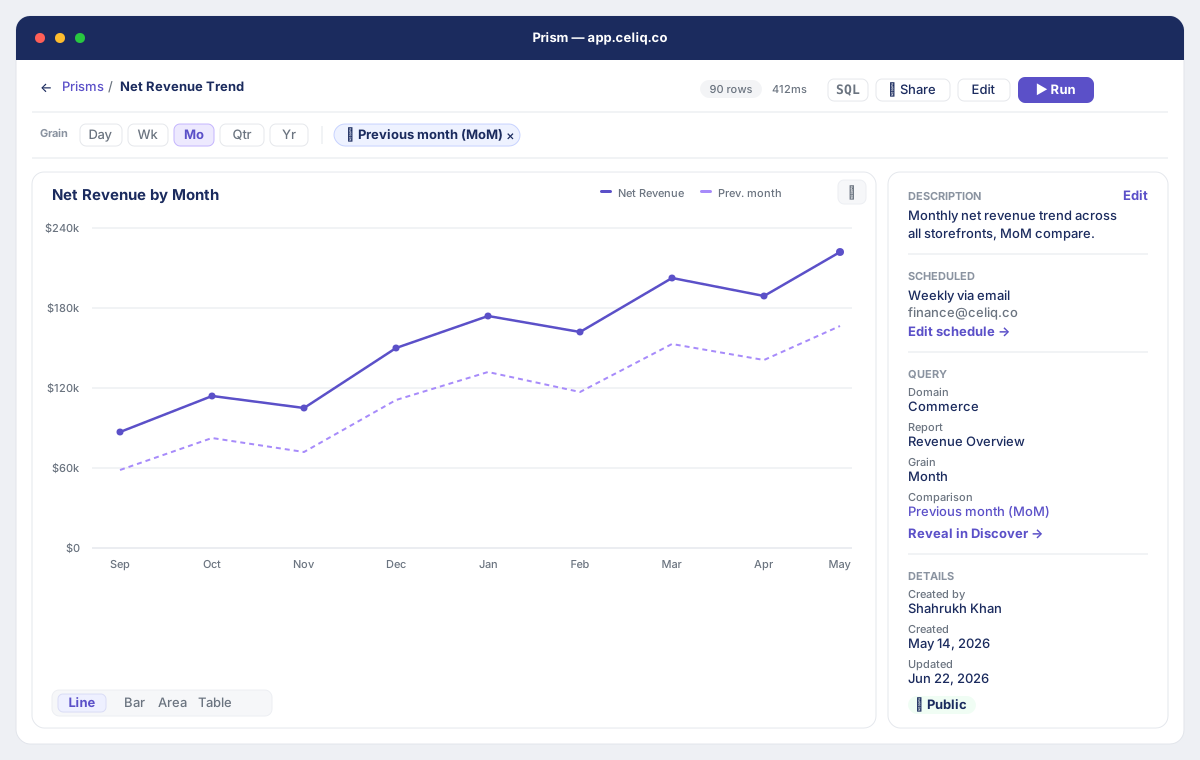
Click ▶ Run in the top bar to re-run at any time. Use the Grain pills (Day, Wk, Mo, Qtr, Yr) and ⇄ Add comparison to slice the data on the fly. These pill overrides are session-only — re-save from Discover to make a view stick.
Pin it to a Mosaic
From the Prism card's ⋮ menu, choose Pin to Mosaic. In the Pin to Mosaic dialog, pick an Existing Mosaic or switch to the + New Mosaic tab to create a fresh Draft Mosaic. The pinned tile stays linked to the Prism, so edits propagate.
Result
You have a named Prism in your chosen Vault. Opening it auto-runs the query against live data, and the row count and query duration appear in the top bar when it finishes. The Prism now also shows up as a live tile on the Mosaic you pinned it to, refreshing whenever the Mosaic is viewed.
Next steps
- Schedule a Report — have Celiq deliver this Prism automatically by email, Slack, or Teams.
- Share a Dashboard — set who can see the Mosaic you pinned to.
- Mosaics — build out the dashboard with more tiles.