The Semantic Layer
How Celiq's semantic layer is structured — Connections, Nodes, Domains and Reveals — and the two places you author and govern it.
When to use it: Whenever you need to understand where a metric comes from, who can edit it, or how a number Orion gives you was defined.
Where to find it: Authored in Forge (the CML editor). Reviewed and governed in Context Studio at
/context-studio.Who can use it: Weavers and Luminaries author it in Forge; Tracers browse it read-only in Context Studio.
The semantic layer is the single source of truth that sits between your warehouse and everything users see — charts in Discover, dashboards in Mosaics, and answers from Orion. Instead of every chart or question re-deriving "what is revenue," the semantic layer defines it once, in one place, so every surface agrees.
You work with the semantic layer through two surfaces. Forge is the authoring IDE where you write the definitions as CML (YAML). Context Studio is the catalog and governance layer where the same objects are surfaced — mostly read-only — so analysts can browse them and admins can certify, audit, and track their health.
Overview
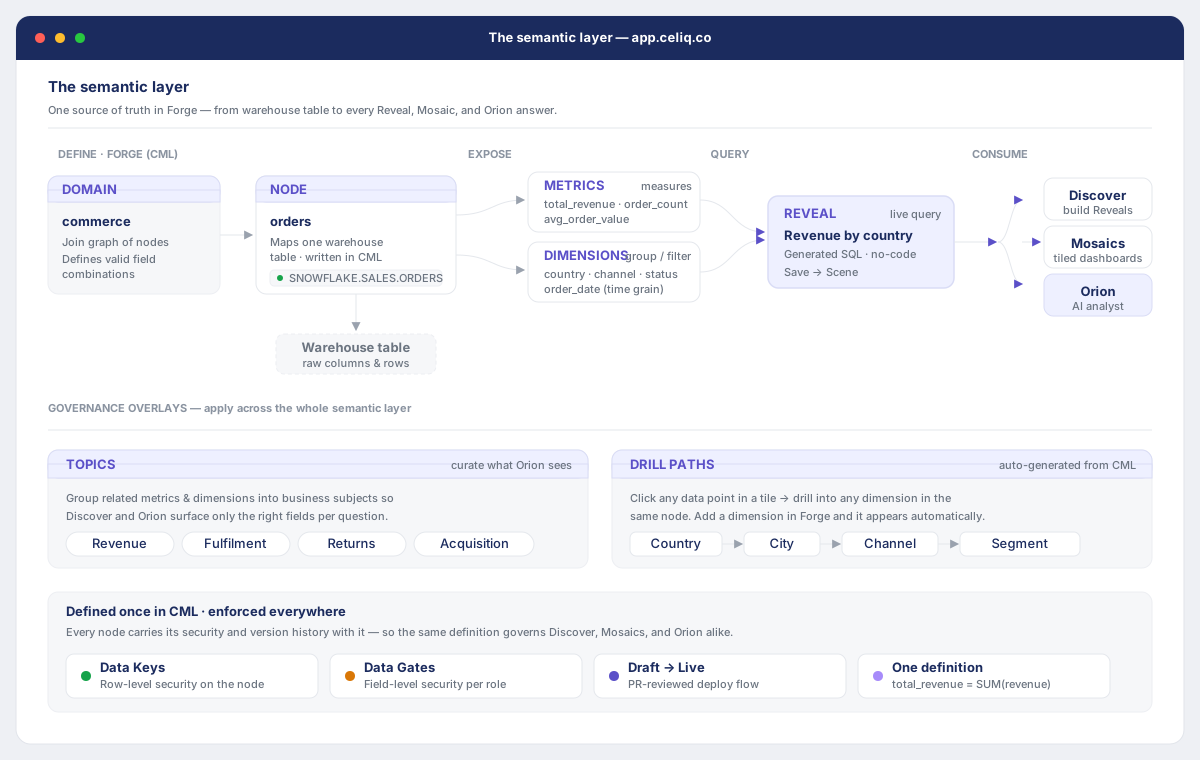
The semantic layer is a hierarchy of four object types. Each one builds on the one before it:
| Object | What it is | Where it's authored |
|---|---|---|
| Connection | A link to a warehouse (Snowflake, BigQuery, Postgres, DuckDB) plus its credentials | Connection wizard |
| Node | One physical table modeled as physical_table + attributes + metrics + calculated_fields | Forge |
| Domain | A business area that groups related nodes and holds a list of reveals | Forge |
| Reveal | A single named, ready-to-use business metric inside a domain | Forge |
A Node maps a warehouse table into business terms. Its attributes are the dimensions you group and filter by (dates, regions, statuses), and its metrics are the aggregations (SUM, COUNT DISTINCT, ratios). A Domain then collects nodes for one area of the business and exposes a curated set of Reveals — the named metrics a Tracer actually picks from when building a chart or asking Orion a question.
Forge is where all of this is written and validated. Context Studio is where it is mapped, scored, and governed: its left sidebar groups every object type into five sections — Semantic Layer, AI Context, Knowledge, Quality and Governance — giving you one map of the whole model.
When to use it
- You want to understand where a number comes from before trusting it in a report or board deck.
- You're a Weaver about to add or change a metric and need to know which Node and Domain it belongs in.
- You're a Luminary who needs to certify a metric, check Semantic Health, or review Lineage and Impact before a change ships.
- A metric "looks wrong" in Orion and you need to trace it back to its CML definition.
- You're onboarding and want a single inventory of every metric, dimension and domain in the workspace.
Concepts
Connection — A configured warehouse plus credentials. Every Domain points at one connection, which is how Celiq knows where to run the SQL. Node — A single physical table modeled in CML. Canonically a node has anode name, a physical_table reference, an attributes list (dimensions), and a metrics list (aggregated measures). On save, Celiq normalizes common aliases — table/sql_table become physical_table, fields/dimensions become attributes, and measures become metrics.
Attribute (dimension) — A group-by or filter column on a node, for example order_date, region, or order_status.
Metric — An aggregated measure on a node, for example total_revenue as a SUM(...) or order_count as a COUNT(DISTINCT order_id). A metric needs a name and a sql, locus, or column; without one it defaults to COUNT(*).
Calculated field — A derived per-row expression stored on the node (managed separately from attributes and metrics). See Calculated fields.
Domain — A business area (e.g. ecommerce, customers). It declares a connection, optional domain-level filters, and a reveals list.
Reveal — A named metric inside a domain. Each reveal has a name, a label, a primary_node, an optional description, and optional filters. Reveals are what Tracers choose from — they are the user-facing face of the semantic layer.
In Context Studio, the Metrics and Dimensions views are read-only catalogs built from your nodes and reveals. They are surfaced there for browsing and governance, but the definitions themselves live in CML and are edited in Forge.
Getting started
You need a workspace with at least one warehouse connection, plus a role that can see the semantic layer. Weavers and Luminaries can author in Forge; Tracers can browse the catalog in Context Studio.
Connect a warehouse
If you haven't already, run the Connection wizard so a Connection exists for Forge to build on.
Open Forge to author
Go to Forge (/building/forge). This is the CML IDE where you create and edit Nodes, Domains and Reveals as YAML, validate them, and run the Check & Save gate.
Open Context Studio to browse and govern
Go to Context Studio (/context-studio). Use the left sidebar to move between the Semantic Layer, AI Context, Knowledge, Quality and Governance sections.
Step-by-step
Here's how the four objects fit together when you build a metric from scratch.
Confirm the Connection
Pick the warehouse Connection your data lives in. The Domain you create will point at it by name.
Author the Node
In Forge, define a node with a physical_table, the attributes (dimensions) you'll group and filter by, and the metrics (aggregations) you need. Forge normalizes aliases and validates the schema on save.
Create or open the Domain
Create a Domain for the business area, set its connection, and add the node to it.
Add a Reveal
Inside the Domain, add a reveal that names the business metric, gives it a friendly label, and points primary_node at your node. This is what users will pick.
Validate and save
Run the Domain and Node validators. Forge's Check & Save gate blocks definitive violations (such as a reveal referencing a field that doesn't exist on its node) and surfaces heuristic issues as warnings.
Review in Context Studio
Open Context Studio to see the new metric in the Metrics catalog, check it under Semantic Health, and — as a Luminary — certify it so Orion prioritizes it.
Examples
A node defines the physical table, its dimensions, and its measures. This is the shape Celiq normalizes to:
<span class="c-key">node</span><span class="c-punc">:</span> <span class="c-name">fct_orders</span>
<span class="c-key">physical_table</span><span class="c-punc">:</span> <span class="c-name">DW_PROD.OMS.FCT_ORDERS</span>
<span class="c-attr">description</span><span class="c-punc">:</span> <span class="c-name">One</span> <span class="c-name">row</span> <span class="c-name">per</span> <span class="c-name">order.</span> <span class="c-name">Primary</span> <span class="c-name">fact</span> <span class="c-name">table</span> <span class="c-name">for</span> <span class="c-name">revenue</span> <span class="c-name">reporting.</span>
<span class="c-key">attributes</span><span class="c-punc">:</span>
<span class="c-punc">- </span><span class="c-attr">name</span><span class="c-punc">:</span> <span class="c-name">order_date</span>
<span class="c-attr">column</span><span class="c-punc">:</span> <span class="c-name">ORDER_DATE</span>
<span class="c-attr">type</span><span class="c-punc">:</span> <span class="c-name">date</span>
<span class="c-punc">- </span><span class="c-attr">name</span><span class="c-punc">:</span> <span class="c-name">region</span>
<span class="c-attr">column</span><span class="c-punc">:</span> <span class="c-name">SHIPPING_REGION</span>
<span class="c-attr">type</span><span class="c-punc">:</span> <span class="c-name">string</span>
<span class="c-punc">- </span><span class="c-attr">name</span><span class="c-punc">:</span> <span class="c-name">order_status</span>
<span class="c-attr">column</span><span class="c-punc">:</span> <span class="c-name">STATUS</span>
<span class="c-attr">type</span><span class="c-punc">:</span> <span class="c-name">string</span>
<span class="c-key">metrics</span><span class="c-punc">:</span>
<span class="c-punc">- </span><span class="c-attr">name</span><span class="c-punc">:</span> <span class="c-name">total_revenue</span>
<span class="c-attr">sql</span><span class="c-punc">:</span> <span class="c-str">"SUM(CASE WHEN status NOT IN ('cancelled','returned') THEN revenue_usd ELSE 0 END)"</span>
<span class="c-attr">type</span><span class="c-punc">:</span> <span class="c-name">currency</span>
<span class="c-punc">- </span><span class="c-attr">name</span><span class="c-punc">:</span> <span class="c-name">order_count</span>
<span class="c-attr">sql</span><span class="c-punc">:</span> <span class="c-str">"COUNT(DISTINCT order_id)"</span>
<span class="c-attr">type</span><span class="c-punc">:</span> <span class="c-name">integer</span>
A domain then groups nodes and exposes reveals — the named metrics users actually choose:
<span class="c-key">domain</span><span class="c-punc">:</span> <span class="c-name">ecommerce</span>
<span class="c-key">connection</span><span class="c-punc">:</span> <span class="c-name">snowflake_prod</span>
<span class="c-attr">description</span><span class="c-punc">:</span> <span class="c-name">Core</span> <span class="c-name">ecommerce</span> <span class="c-name">data</span> <span class="c-name">model.</span> <span class="c-name">Source</span> <span class="c-name">of</span> <span class="c-name">truth</span> <span class="c-name">for</span> <span class="c-name">growth</span> <span class="c-name">metrics.</span>
<span class="c-key">reveals</span><span class="c-punc">:</span>
<span class="c-punc">- </span><span class="c-attr">name</span><span class="c-punc">:</span> <span class="c-name">total_revenue</span>
<span class="c-attr">label</span><span class="c-punc">:</span> <span class="c-name">Total</span> <span class="c-name">Revenue</span>
<span class="c-key">primary_node</span><span class="c-punc">:</span> <span class="c-name">fct_orders</span>
<span class="c-attr">description</span><span class="c-punc">:</span> <span class="c-name">Net</span> <span class="c-name">revenue</span> <span class="c-name">excluding</span> <span class="c-name">cancelled</span> <span class="c-name">and</span> <span class="c-name">returned</span> <span class="c-name">orders.</span>
<span class="c-punc">- </span><span class="c-attr">name</span><span class="c-punc">:</span> <span class="c-name">order_count</span>
<span class="c-attr">label</span><span class="c-punc">:</span> <span class="c-name">Orders</span>
<span class="c-key">primary_node</span><span class="c-punc">:</span> <span class="c-name">fct_orders</span>
<span class="c-attr">description</span><span class="c-punc">:</span> <span class="c-name">Total</span> <span class="c-name">number</span> <span class="c-name">of</span> <span class="c-name">distinct</span> <span class="c-name">orders</span> <span class="c-name">placed.</span>
A Tracer never sees the SQL. They pick Total Revenue from the ecommerce domain, and the semantic layer resolves it back through the reveal → node → connection chain to run the right query.
Best practices
- Model the table once, expose it many times. Define attributes and metrics on the Node; reuse them across as many Reveals as you need rather than re-deriving them.
- Name reveals in business language.
label: Total Revenueis for users; the underlyingtotal_revenuemetric is the implementation. - Keep one definition per metric per domain. A metric with the same name in two domains can create a conflict that Orion has to disambiguate.
- Certify what's trustworthy. Certified reveals get priority in Orion's answers and raise your Semantic Health score; leave uncertified ones marked for review until a Luminary signs off.
- Watch the warnings. Forge flags aggregate-looking fields placed in
attributes, and dimension-looking columns used as measures. These warnings catch modeling mistakes early.
Tips
Use Context Studio as your map and Forge as your workshop. When something looks off in a chart, start in Context Studio's Metrics or Lineage view to find the object, then jump to Forge to fix the CML. Certified reveals show a green badge and are always preferred by Orion over uncertified ones.
Common mistakes
- Trying to edit metrics in Context Studio. The Metrics and Dimensions views are read-only catalogs. Author and change definitions in Forge.
- A metric with no
sql,locus, orcolumn. It silently defaults toCOUNT(*). Always give a metric an explicit definition. - Putting an aggregate in
attributes. A field whose SQL containsSUM(...),COUNT(...), etc. is a metric — Forge will warn and move it. - A reveal pointing at a field that doesn't exist on its node. The Domain save gate rejects this once the node exists.
- Duplicate metric or attribute names on one node (even case-insensitive duplicates). The Node save gate blocks the save.
Troubleshooting
| Symptom | Cause | Fix |
|---|---|---|
| Save rejected: "Fix the duplicate or invalid field before saving the node" | The node has duplicate metric/attribute names (case-insensitive) or an invalid field | Rename or remove the duplicate, then save again |
| Save rejected: "Fix the reveal field references before saving the domain" | A reveal references a field that doesn't exist on its (already-created) node | Correct the reveal's field or primary_node; reveals whose node isn't created yet are skipped |
| Validator warning: "⚠ Missing physical_table" | The node has no physical_table and isn't using SQL mode | Add a physical_table (or table / sql_table, which normalize to it) |
| Validator warning: "⚠ ' | A metric's underlying column looks like an ID, flag, or geo field | Move it to attributes, or keep it if it's a legitimate COUNT DISTINCT |
| Validator warning: metric "has no sql, locus, or column — will default to COUNT(\*)" | The metric definition is incomplete | Add an explicit sql, locus, or column |
| Domain validator: "⚠ No reveals defined" | The domain has an empty reveals list | Add at least one reveal so the domain exposes a usable metric |
| A metric shows a conflict badge in Context Studio | The same reveal name exists in another domain with a different description | Reconcile the definitions, or resolve them under Cross-Domain |
Related pages
- Forge — the CML IDE where you author Nodes, Domains and Reveals
- Reveals — the named metrics users pick from
- Domains — how business areas group nodes and reveals
- Metrics — the metric catalog in Context Studio
- Dimensions — the dimension catalog in Context Studio
- Catalog — browse what's available across the workspace